LaundryRx privacy policy in Dedham Massachusetts
LaundryRx • Dedham, Massachusetts

Privacy Policy Your Information. Your Privacy.

This Privacy Policy explains the information LaundryRx may collect, how that information may be used or shared, and the choices available to you regarding your personal data.

LaundryRx Privacy Data & Account Controls
Information Collection
Information Use & Storage
Account Privacy Controls
Requests Data Deletion
Privacy Information Collection
Security Data Protection
Account Deletion Requests
Questions Privacy Support
LaundryRx Privacy Policy

Understanding How We Handle Your Information.

Welcome to LaundryRx. This Privacy Policy has been created to explain the types of information we may collect from you and how that information may be used. LaundryRx believes in transparency and values your privacy.

Personal Data Collection
Account Privacy Controls
Data Deletion Requests
Policy Updates

Changes to This Privacy Policy

LaundryRx may change or discontinue this Privacy Policy at any time and reserves the right to do so. If this Privacy Policy changes, the Effective Date will also be updated.

If you continue to use the App after the Effective Date has changed, your continued use indicates acceptance of the updated Privacy Policy.

Advertising & Cookies

Google Advertising & Remarketing

This website may use the Google AdWords remarketing service to advertise on third-party websites, including Google, to previous visitors to the LaundryRx website.

This may include advertising to previous visitors who have not completed an action on the site, such as submitting a contact form. Advertisements may appear in Google search results or on sites within the Google Display Network.

Third-party vendors, including Google, may use cookies to serve advertisements based on someone's previous visits to the LaundryRx website.

Any data collected will be used in accordance with the applicable privacy policies. You may manage advertising preferences and cookie settings through Google and your web browser.

Information Collection

What Do We Collect from You?

LaundryRx may collect personal information that you voluntarily submit through the App.

  • Information that you voluntarily submit to the App.
  • Your username, name, email address, phone number, state, city, country, or ZIP code.
  • Payment information used to complete a transaction.

LaundryRx may also collect personally identifiable or technical information including:

  • Your IP address.
  • Your geolocation.
  • Information about your use of the App.
  • Information stored in cookies, pixel tags, or web beacons.
  • Additional analytics information that you voluntarily submit to the App.
Use of Information

How Do We Use This Information?

LaundryRx may use personal and personally identifiable information to:

  • Provide you with the App and its services.
  • Communicate with you.
  • Troubleshoot problems with the App.
  • Complete transactions that you initiate.
  • Update you about changes to the App.
  • Update you about LaundryRx services or services offered by third parties.
Storage & Security

How Do We Store Your Information?

LaundryRx stores and processes personal and personally identifiable information on computers located within the United States.

By using the App, you agree to the collection and processing of your personal and personally identifiable information in the United States.

LaundryRx uses commercially standard technology to help protect against unauthorized disclosure of personal and personally identifiable information, including encryption.

Although LaundryRx takes steps to protect information, all information is provided at your own risk.

Third Parties

Do We Share Information with Third Parties?

LaundryRx may share personal or personally identifiable information with third parties in the following situations:

  • When LaundryRx or one of its licensees has obtained your consent.
  • When sharing is necessary to provide services initiated at your request.
  • When sharing is necessary with LaundryRx parents, subsidiaries, successors, licensees, or assigns.
  • When LaundryRx has been purchased by or has purchased a third party.
  • When needed to respond to information requests from government authorities.
  • When required by a court order or subpoena.
  • When necessary to protect LaundryRx employees, independent contractors, users, members, officers, directors, or shareholders.
  • When necessary to help prevent fraud or violations of applicable laws, statutes, regulations, ordinances, or treaties.

Mobile opt-in data will not be shared with third parties.

Personal or personally identifiable information that you include within your App profile or elsewhere on the App or related websites may also be displayed to third parties. Please review information before submitting it.

Your Privacy Controls

How Can I Stop Information Collection?

You may limit LaundryRx's collection of personal or personally identifiable information by:

  • Adjusting your web browser settings to block or limit cookies, pixel tags, and web beacons.
  • Deleting your account in accordance with the applicable Terms of Use Agreement.
Account Security

Your Responsibilities When Using the App

When using the App, you are responsible for:

  • Informing LaundryRx or its licensees of changes to your personal or personally identifiable information.
  • Protecting the security of your username, password, and personal information.
Remove Social Sign-In

Step 1: Manage Social Media Logins

Log into your LaundryRx account, open the Manage Account section, and select Manage Social Media Logins.
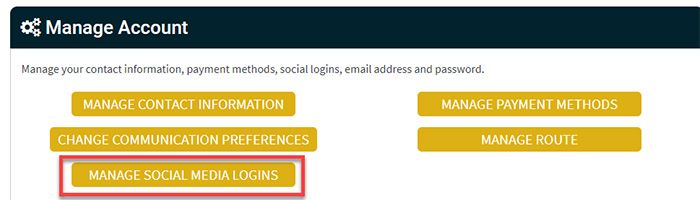
LaundryRx Manage Account screen showing Manage Social Media Logins
  • Log into your account: Sign in to your LaundryRx account.
  • Open Manage Account: Navigate to your account management options.
  • Select Manage Social Media Logins: Open the section used to manage connected social accounts.
Remove Social Sign-In

Step 2: Delete the Connected Login

The External Logins screen displays connected Facebook and Google logins. Select Delete next to the login that you want to remove.

LaundryRx External Logins screen showing Facebook and Google delete options
  • Review Active Logins: Locate the Facebook or Google login connected to your account.
  • Select Delete: Choose Delete next to the social login that you want to remove.
  • Remove Additional Logins: Repeat the process if more than one external login is connected.
Facebook Data

How to Request Facebook Data Deletion

To request deletion of your Facebook-related data, email [email protected] .

Google Data

How to Request Google Data Deletion

To request deletion of your Google-related data, email [email protected] .

All Account Data

How to Request All Data Deletion

To request deletion of all applicable account data, email [email protected] .

California Residents

Your California Privacy Rights

California residents have the right to receive information identifying third-party companies or individuals with whom LaundryRx has shared personal or personally identifiable information during the previous calendar year.

This includes a description of the categories of personal or personally identifiable information disclosed to those third parties.

This information may be requested once per year and free of charge by contacting LaundryRx at [email protected] .

Privacy Support

Questions About This Privacy Policy?

All questions and concerns regarding this Privacy Policy may be directed to LaundryRx by emailing [email protected].

X

LaundryRx TrustIndex Reviews Stars LaundryRx TrustIndex Reviews Badge
×